
Google Sheets renewal tracking system
The renewal date isn't the deadline.
The notice date is.
Most contracts renew automatically unless you cancel a set number of days ahead. Chronivue tracks every subscription, policy, and vendor contract you have, calculates the real cancellation deadline for each one, and emails you before that window closes. It runs entirely in Google Sheets.
One payment. No subscription. Email reminders included.
Every other tracker shows you the date on the right. Chronivue works backward from your contract's notice period, gives you the date that actually matters, and emails you ahead of it.
Email reminders
It tells you. You don't have to remember to look.
A tracker only works if somebody opens it. So Chronivue checks your sheet every morning and emails you when a cancellation window is closing, a notice deadline is today, or a next action is due. Nothing due, no email.
Chronivue · 7:04 AM
Chronivue: 3 items need your attention
CHRONIVUE
3 items need your attention
Here is what is coming up on your Renewals tab as of Sep 1, 2026.
Adobe CC (Adobe)
Today is the last day to cancel or give notice. Renews Sep 15, 2026 automatically.
GL Insurance (The Hartford)
Next action: Call broker to reinstate. Was due Aug 27, 2026, 5 days ago.
Auto Insurance (Progressive)
Last day to cancel is Sep 4, 2026, in 3 days. Renews Oct 4, 2026.
A sample reminder, shown with example data.
- One email, not a pile. Everything due arrives in a single message, and each deadline is flagged once, not daily
- Every item links to its row, so it's one click from your inbox to the right line
- It stays in your copy. The script reads only that spreadsheet and emails only you. Nothing is sent to Chronivue or anyone else
- On and off from a menu. Turn reminders on once from the Chronivue menu, and off the same way
What you get
Everything in one sheet you already know how to use
No new software, no login, no monthly bill. Open it in Google Sheets, make your own copy, and start typing.
- Automatic notice date math so you see the last day you can still cancel, not just the day it renews
- Email reminders on any morning something is due, so the deadline finds you
- A fill-in form for adding renewals. Two required fields, and no hunting across nineteen columns
- Next action and due date on any item that needs a call, a quote, or a decision
- Color coding that means something. Red for missed or overdue, amber for approaching, green for on track
Annual and monthly bills, finally on the same scale
- General liability$2,400 / year→$200.00 / mo
- Waste collection$2,040 / year→$170.00 / mo
- QuickBooks$90 / month→$90.00 / mo
Every line carries an effective monthly cost, so a $2,400 insurance policy and a $90 software bill can finally be compared without doing the arithmetic yourself.
The math
It only has to catch one.
14-day refund if it isn't for you.
Inside Chronivue
See what needs action this week
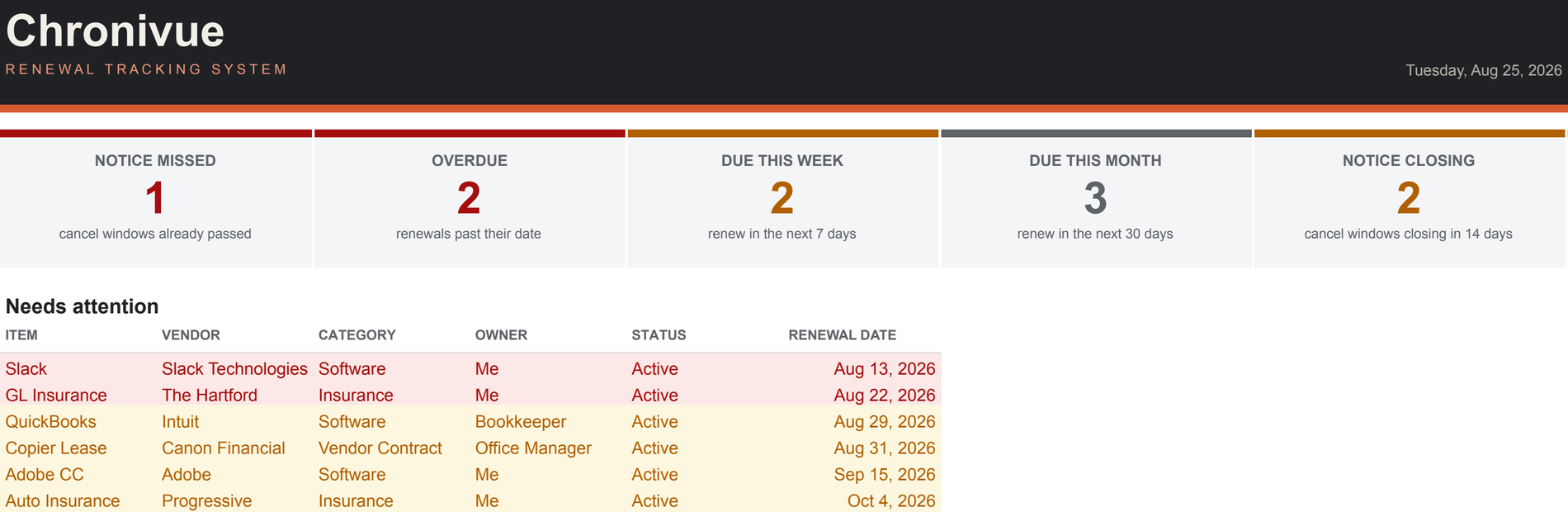
Five cards answer the only questions that matter on a Monday morning: what did I already miss, what's overdue, what renews in the next seven days, what renews this month, and which cancellation windows close in the next two weeks. Below them, a list of exactly which items to deal with first.
One row per renewal, and the math does itself
Enter the item, the vendor, the renewal date, and how many days notice the contract requires. Chronivue calculates the notice date, a reminder date ahead of it, and the effective monthly cost. The gray columns never need typing. The dropdowns come from a Lists tab you can edit.
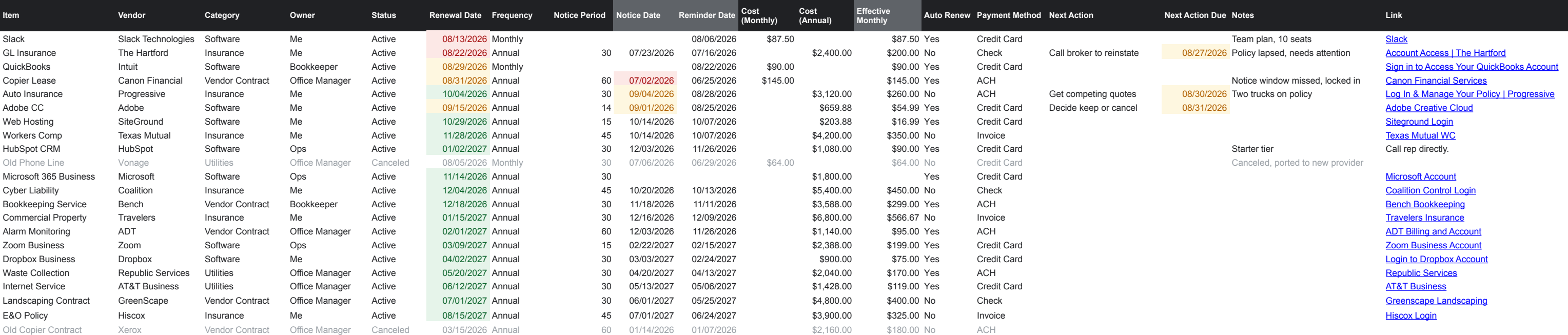
Scroll the table to see every column →
Add a renewal without touching a cell
Choose Chronivue › Add a renewal and a short form opens. Only the item and the renewal date are required; the rest can wait. Your entry lands in the next empty row and the calculated columns fill themselves in.
The dropdowns come from your own Lists tab.
Questions
Before you buy
Is this a subscription?
No. One payment of $49 and the sheet is yours, email reminders included. There's nothing to renew, nothing to cancel, and no account to manage.
Won't I just forget to check it?
That's what the email reminders are for. Turn them on once and the sheet checks itself every morning around 7am. If a notice window is closing, a notice deadline is today, or a next action is due, you get one email listing it. On quiet days you get nothing. A weekly look at the Dashboard is a good habit, but the system doesn't depend on it.
Do I need to install anything?
No. Chronivue is a Google Sheet with the reminders and the form built in. If you have a Google account, you have everything you need. The first time you use either one, Google asks you to approve the script and shows a "Google hasn't verified this app" screen. That's normal for a script that lives inside your own sheet, and you only do it once.
What can the reminder script see?
Only the spreadsheet it lives in. It can't see your other files, your Drive, or your inbox, and it emails only you, at the Google account you turned it on with. Nothing in your sheet is sent to Chronivue or anyone else.
What exactly do I receive?
A link that makes your own copy of the Chronivue sheet in your Google Drive. It has five tabs: a Start Here guide, the Dashboard, your Renewals tracker, a filled-in Example to look at, and a Lists tab holding the dropdown options. A Chronivue menu in the sheet holds the Add a renewal form and the email reminders.
What's a notice period, and why does Chronivue care so much about it?
Most contracts renew automatically unless you cancel in writing a certain number of days beforehand. Thirty and sixty days are common. That deadline arrives well before the renewal date, and missing it usually means paying for another full term. Chronivue calculates it for every item, sometimes called the cancel-by date, so you're working from the real date.
Does it work on my phone?
Mostly. Your tracker opens and edits in the Google Sheets app, and reminder emails reach you wherever you read email. The Chronivue menu and the Add a renewal form only appear in a web browser on a computer, so that's where you turn reminders on.
Can I change it?
Yes. It's your sheet. Edit the categories, owners, and payment methods on the Lists tab, add columns, change the formatting. The Dashboard and Example tabs are protected so you don't break them by accident, and you can unprotect them if you want to. Just keep the column headings in row 1 and the name of the Renewals tab as they are. That's how the reminders and the form find your data.
What if it isn't right for me?
Email within 14 days and I'll refund you. It's a spreadsheet, not a hostage situation.
Delivered instantly · Works in Google Sheets · Email reminders included · Pay once
Coming next
Want a more advanced dashboard?
Join the waitlist for Chronivue Pro, with charting and multi-year cost views.
No spam. No obligation. Unsubscribe anytime. See our Privacy Policy.